


Why Choose Us?
Rich Experience
Dongguan WS Electronic Technology Co., Ltd, is a professional manufacturer of OEM Connector and Cable Assembly with more than 18 years' experience.
Broad Market
The products are sold to all over the world: Europe, America, Middle East, Southeast, Africa and other countries and regions, it has been widely recognized and trusted by many customers.
Wide Product Range
Dongguan WS Electronic Technology Co., Ltd, Main products are DC Connectors, Earphone Connectors, Mobile Phone Charger connectors, Audio and Video Connector and Corresponding Cable Product. They are popular used in mobile phone, headset, car charger, LED light, electric toothbrush, beauty instrument, medical equipment.
Advanced Equipment
Company introduces first-class production equipment and testing equipment: high-speed precision automatic lathe and punching machine, original vertical injection molding machine, automatic assembly machine, high voltage tester, insertion force tester, salt spray tester, current load instrument, environmental tester, which is essential to ensure product quality, price, delivery time to meet customers' needs.
Definition of Audio Video Cable
The audio video cable is usually an RF coaxial designed in the early 1940s and is used to carry audio and visual signals. That's why sometimes it's also referred to as "A/V" jacks. It is used as a power connector, an RF connector, and also as a connector for loudspeakers. Cables usually refer to two or more wires that are bonded or twisted together to carry electric current. Audio video cablees are those that transmit both audio and video signals.


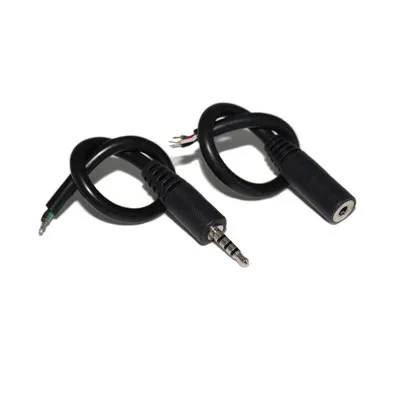
Product Categories
Latest Products



Benefits of Audio Video Cable
High-Quality Video and Audio Transmission
Audio video cables are designed to deliver impeccable video and audio quality. With support for high-definition (HD) and ultra-high-definition (UHD) video formats, these cables ensure that every pixel is displayed with stunning clarity.
Additionally, audio video cables transmit audio digitally, eliminating any loss in quality that may occur with analog connections. Say goodbye to fuzzy images and distorted sound – audio video cables provide a truly immersive audiovisual experience.
Ease of Use and Convenience
One of the standout advantages of audio video cables is their simplicity and ease of use. Unlike the days of multiple cables for video and audio, HDMI combines both into a single cable, streamlining the connection process.
With a straightforward plug-and-play functionality, you can effortlessly connect your devices without the need for complex setup procedures.
Moreover, audio video cables reduce cable clutter by consolidating multiple connectors into a single sleek cable, giving your entertainment setup a clean and organized appearance.
Versatility and Compatibility
Audio video cables are remarkably versatile and compatible with a wide range of devices. Whether it's a television, monitor, projector, or audio system, audio video cables seamlessly connect your devices, ensuring optimal performance across the board.
What's more, HDMI supports various versions, allowing backward compatibility and enabling you to use older devices with newer HDMI-enabled equipment. With HDMI, you can transmit not only video and audio signals but also control signals, making device synchronization and control more convenient.
Enhanced Features and Functionality
Beyond delivering high-quality audio and video, audio video cables offer additional features that enhance your multimedia experience. If you're a fan of 3D content, audio video cables support 3D video transmission, allowing you to immerse yourself in a three-dimensional world.
Moreover, audio video cables can carry Ethernet signals, enabling internet connectivity between HDMI-enabled devices. This feature eliminates the need for separate Ethernet cables, simplifying your setup.
audio video cables also incorporate the Audio Return Channel (ARC), enabling audio to be sent back from your TV to your audio system with a single cable, simplifying your audio setup.
Future-Proof and Reliable
HDMI technology continues to evolve, paving the way for exciting advancements in audiovisual transmission. With the introduction of higher refresh rates and low input lag, audio video cables cater to the needs of gamers and fast-paced content enthusiasts.
The support for an extended color gamut and deep color ensures that you experience vibrant and true-to-life colors. audio video cables also offer features like audio synchronization and lip-sync correction, which guarantees seamless audiovisual harmony.
Most people are familiar with one or more of these cables, but others may be new to you. However, chances are you have at the very least one of these cables within your business or home.
COMPOSITE AV CABLE
The most well-known form of composite audio video cable is standard RCA cable. Many of you may have experienced the cable in your grandparents' or parents' televisions or VCRs because older televisions feature RCA Jacks. This RCA cable has the standard yellow, red and white colour-coded connectors. A majority of devices do not use RCA cables as they aren't able to transfer high-definition signals.
SUPER-VIDEO
Sometimes referred to as S-VID, these cables were used by the older models of DVD players, VCRs as well as TVs. In the past, S-VID cables were introduced as an alternative to composite cables. Because TV manufacturers stopped the installation of S-VID connectors, these connectors rarely seen anymore.
COAXIAL CABLE
All televisions come with a coaxial input, but this is most commonly used for satellite TV, set-top boxes and some gaming consoles. Coaxial cable is also widely used in broadcast applications.
VGA/DIGITAL VISUAL INTERFACE (DVI)
In the past, if you've connected your laptop or computer to another television or monitor, it could have been connected using a VGA cable. Although VGA cables were often the primary method of connecting computers for several years, they're not as widespread these days.
Another alternative option is a DVI cable. This works similarly to a VGA cable, except it's a digital-to-digital cable. The reason a digital-to-digital signal is so important is that there is minimal interference, which allows for sharper images and more vibrant colours.
HIGH-DEFINITION MULTIMEDIA INTERFACE (HDMI)
At present, most computers can be connected to other televisions or monitors with the HDMI cable. No matter if you're tech-savvy or not, you've likely seen many types of HDMI outputs. It is important to verify your specific television and other devices prior to changing your cables.

The audio video cable cable transmits video through two synchronized signal-and-ground pairs, named Y and C:
Y is the luma signal, which carries the luminance or the black-and-white elements of the video. It also includes horizontal and vertical synchronization pulses.
C is the chroma signal, which carries the chrominance, the color portion of the picture. This signal includes both the saturation and hue elements of the video.
If both your output device (computer, DVD player, or game console) and your input device (television) have an audio video cable port, all you need is an audio video cable cable with the correct number of holes at each end.
How to Wrap a Audio Video Cable?
After using our audio video cables, most of us don't think about the proper way to wrap them other than to quickly get them out of the way and cram them into whatever space available. However, the way you wrap and store your cables can have a significant effect on their longevity.
(1) Over-Over
This is definitely the most common wrapping method out there. On the surface, it makes sense, right? You wrap the cable in the same consistent motion.
The problem with wrapping cable in this way is that the cable is continually twisted along its length and when dropped, there are all sorts of tangles and kinks that must be laboriously undone.
Aside from the simple inconvenience, the twisting over time can put stress on the cable and increase the likelihood of internal shorts which may cause it to stop working, or open gaps in its shielding, allowing for more interference. This is especially important for instrument cables and microphone cables, which are prone to pick up more noise.
(2) Tying
Some will wrap their cables in a bunch, or do the over-over method and then use the cable to tie itself together. This adds even more stress to the cable and will decrease its life significantly quicker, so we highly discourage you from this method.
(1) Over-Under
It may be a little funny to get used to at first, but once you start wrapping your cables in this way it becomes very intuitive. As we mentioned before, the issue with the over-over cable wrapping method is that the cable is continually twisted along its length. The over-under method means as you are twisting with the "over", you are untwisting with the "under".
This will reduce the tension on the cable while wrapping and as it's stored, making it easier to uncoil and ultimately increasing the cable's longevity.
You'll know you're doing it right when you can throw your cable and it uncoils without any snarls or kinks.
(2) Cable Storage
When storing your cables, try to keep them either hanging or laying in a relaxed position as much as possible. Cable ties come in very handy for keeping your cables neatly organized and separated, especially if you have them in a pile or gig bag.
If you've had cables stored for a while that you don't frequently use and don't know whether they still work or not (because you certainly don't want to test them at a gig), it's also helpful to invest in a cable tester. This allows you to test each connection point on your cables and make sure everything is in working order before putting them into commission.
There are multiple types of connections for video signal transfer into a TV. Most combine audio and video together, others are video only, and some connections no longer appear on newer TVs.
Types of video connections and some comparison points:
● Radio Frequency (RF), also known as coaxial, include the VHF/UHF, CABLE, and AUX jacks. These input terminals carry video and audio signals and are used for connecting an indoor/outdoor antenna or cable for cable TV service.
● Composite Audio/Video (A/V), sometimes known as a RCA connection, combines black & white and color information into a single video signal and separates the audio into left and right channels. It provides better picture quality than RF. This connection transfers both audio and video signals.
● Composite Conversion Audio/Video (A/V) Input transfers audio and video information in the same manner as the composite audio/video connection, but has a different form factor. This connection type is available on Android TV/Google TV devices and has a specific set of requirements when purchasing. Refer to Connecting a device to the Android TV/Google TV Video In jack using a RCA composite cable for more information.
● S-Video offers somewhat higher quality than composite video because it has conductors to separate the black-and-white and color signals. Only video is transferred through this connection. Due to the ability to only carry video, this connection type is now found in legacy products.
● Component Video terminals offer better quality than S-Video. These terminals divide the video signal into three component parts: black & white luminance (Y), blue color difference (PB), and red color difference (PR). This enables rich, accurate color. Only video is transferred through this connection.
● Digital Video Interface (DVI) enables compressed digital-to-digital transport of a video signal. This connection is secured by HDCP technology to protect the signal from piracy. Only video is transferred through this connection to the TV, so be sure to check both the cable and the device to ensure that the DVI connection will transfer video only or both video and sound.
● High-Definition Multimedia Interface (HDMI) transfers uncompressed high-definition digital video and audio. This connection is also secured by HDCP technology to protect the signal from piracy. It is the most popular form of audio and video transfer and provides the highest levels of sound quality and video resolution.
A well-made audio video cable should work well up to 5 meters. You may even get a good signal at 10 meters or more.
However, by the time you get to this length, you are more likely to run into problems. So, consider buying a higher-quality digital optical cable for longer runs. However, bear in mind that your equipment will also impact this.
The electronics built into your hardware can vary in quality, and you may find that some devices will work over a long cable run – while others won't. You may just have to try it and see.

How Often Should I Replace My Audio Video Cables?
Cables don't "wear out" in the same way that some components, such as vacuum tubes, do. In most cases, unless it is damaged or suffers wear from being coiled/uncoiled, stepped on, pulled, twisted, bent, or otherwise abused, a cable will continue to perform just as it did when you purchased it. You can infer from this that cables used onstage for live performance probably won't last as long as those used to "permanently" wire up an equipment rack in a studio.
Another aspect of this is that a poor quality cable can often be the weak link in a signal path. Therefore, another reason to replace a cable is to upgrade it to a better one to improve signal quality and cable durability. In other words, inexpensive cables may degrade the signal enough to sound noisy, lose signal quality, or flat out break sooner than high-quality cables. There's no exact number of days that a given cable will last, but in general if you've bought the cheapest cable available, you can expect it to need to be replaced at some near-future point, while a more expensive cable might last for many years making it a better investment in the long run. So, having said that, you should replace your cables when they stop working, become intermittent, or you notice noise or signal degradation that can be traced to your current cables.
Can Audio Video Cables Affect Picture Quality?
Resolution Support
Different Audio Video Cables support different resolutions. Higher-quality cables often support higher resolutions, such as 4K or 8K, without sacrificing picture quality. Conversely, using a low-quality cable with a high-resolution display may result in a degraded picture or an inability to achieve the desired resolution.
Refresh Rate
Audio Video Cables also affect the refresh rate at which images are displayed on the screen. Higher-quality cables can support higher refresh rates and deliver a smoother viewing experience.
Color Depth
Audio Video Cables can affect the color depth and accuracy of the displayed image. Higher-quality cables typically provide better color fidelity, ensuring that colors appear more vibrant and true to life.
Our Factory
Dongguan WS Electronic Technology Co., Ltd, Main products are DC Connectors, Earphone Connectors, Mobile Phone Charger connectors, Audio and Video Connector and Corresponding Cable Product. They are popular used in mobile phone, headset, car charger, LED light, electric toothbrush, beauty instrument, medical equipment. The products are sold to all over the world: Europe, America, Middle East, Southeast, Africa and other countries and regions, it has been widely recognized and trusted by many customers.
Company introduces first-class production equipment and testing equipment: high-speed precision automatic lathe and punching machine, original vertical injection molding machine, automatic assembly machine, high voltage tester, insertion force tester, salt spray tester, current load instrument, environmental tester, which is essential to ensure product quality, price, delivery time to meet customers' needs.

Ultimate FAQ Guide to Audio Video Cable
As one of the leading audio video cable manufacturers and suppliers in China, we warmly welcome you to wholesale high-grade audio video cable made in China here from our factory. All customized products are with high quality and low price. For free sample, contact us now.
47517 DC Jack Connector